

Products Inventory
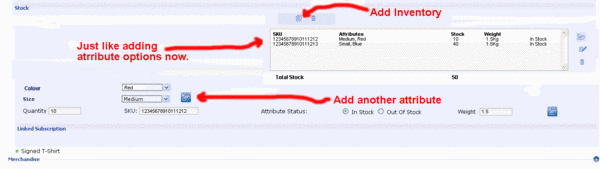
- Click to enlarge
The Product Attributes are not functioning to a level where a store can rely on it to manage a complex inventory.
The old style osCommerce attributes do not make any relationship between the attribute, it's stock quantity and the product. At present, we can only know this much about the inventory of a product: There are 45 Red attribute items, 30 Bluen attribute items, 40 cotton attribute items and 35 Nylon attribute items, implying 75 T-Shirts products in total.
There are some bugs:
1.) It is not possible to add options to attributes.
2.) If there are no attributes added to a product, the "click here to add attribute" jumps to the attibutes page instead of allowing the user to set the attributes for the product.
This is what we need:
3.) Merge Attribute Inventory Control and Stock and rename as Inventory so that an admin can set the exact stock levels. For example:
20 Red cotton T-Shirts
10 Blue cotton T-shirts
35 Red nylon T-shirts
10 Blue nylon T-shirts
Total Items 75
4a.) Remove the option to add the Product Stock value. This is to be created dynamically and displayed as the total number of individual items.
4b.) Move weight as an attribute of each product item. (Maintain the weight relationships with shipping.)
4c.) Use the add/update/delete feature in Products > Attributes > Add attribute options. It is a good device.
4d.) Use the attached image draft as a guide.
5.) Instead of using weight, change option to a radio button choice, Physical/Virtual. If physical is chosen, display the "Weight" input field, if virtual is chosen, display "Downloads per customer" input field, an "Available until"
date picker. (This is the last date the download can be made) and a browse for file field so they can upload the virtual product. (virtual files are to be stored as usual in the download directory.)
6.) If the product is virtual, add a "Download" link to both the Current Purchases and next to the item in the Order Information detail page in the My Account area. Add a "Download" Link next to the product in the email sent to the customer after the purchase.
7.) Add an error message to be displayed if the customer has reached their limit as defined in "Downloads per customer".
8.) When the admin tries to upload a virtual product the first time and the download directory permissions prevent this, display an error "Set the permissions on the directory 'download' to allow write access for the webserver process."
9.) In some places, Freeway does not sense correctly if the webserver process can actually write to the area required; like the images directory. Change the write premissions tests to actually test if there is a writeable directory on these directories:
images
images/big
images/small
templates/your_template/images
admin/images
admin/images/graph
download
admin/backups