

Alert Messaging
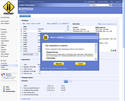
- Alert messaging
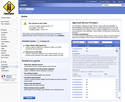
The Freeway Alert Messaging system is an improvement to the upgrade alert mechanism in the Freeway admin tool (at the bottom of the left menu) to assist users to update their installation or pass on important messages.
Here is what we are planning:
1.) Modify the installation so a tickbox choice is asked of the installer:
What type of upgrade notices do you want to receive?
I am new to Freeway, just tell me about major releases.
I am a developer, alert me when there are new Subversion revisions.
Email me when there are security alerts. (Very strongly recommended)
Email address <email input form>
Confirm address <email input form>
2.) Repeat this feature in Shop Settings > Advanced as Freeway Version Alerts.
3.) If a user has selected Developer, change the Upgrade alert message to display at every subversion revision, for example 1.3.0.x.
If a user has selected "new user", change the Upgrade alert message to display at every x release, for example x.x.0.139 This way, they will be advised only for Major and Minor Releases.
4.) The "Do not display again" tick box will not display for Alert messages. The other messages will display that tick box.
5.) Extend www.zac-ware.com/fileadmin/freeway/freeway.xml to hold information to alert users. Add this metadata to the file:
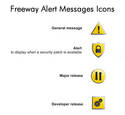
Major Release image: the Major Release image file location
Developer Release image: the Developer Release image file location
Alert release image: the alert release image file location
General message image: the general message image file location
Major Release message: the text for the Major Release message
Developer Release message: the text for the Developer Release message
Alert release message: the text for the alert release message
General message: the text for the general message
general message display start: start date for the general message to be displayed
general message display end: end date for the general message to be displayed
6.) Every time each top admin user logs in while their version is not up to date and until they choose to not display the message and during the display start and end time for the general message, the appropriate image Developer/New User/Alert must be displayed. There is to be a subtle tickbox option to hide the image and message.
7.) Overlapping messages. If a general message is set to appear at the same time as either or both an alert message or a release message or if an alert and a release message should be displayed, use a general message image and load each message in the message area.
8.) Here are the samples for the Alert messages extension. The Approved Service Providers are displayed on the right side of the page as in the example.
9.) The upgrade link will be to a page inside the Freeway admin. The content of the page is to be XML fed. On that page, for new users, the page will linked to the Freeway download page where they will find an upgrade file. For developers, they will be lead to the page describing how to use the public SVN repo.
Examples of General messages might be things like news about the Freeway community etc. It could be information related to the anything and is not linked to the release cycle of Freeway. This is why it needs a start and end date so we can limit when it is displayed.